BXM Memo
BXM Memo skips a command when its inputs haven’t changed. Put bxm-memo run in front of a slow step, say what it reads and writes, and the next time the inputs match it restores the outputs instead of running the step. When the inputs don’t match, it says which one changed.
bxm-memo run -i 'proto/**/*.proto' -i gen.sh -o gen/ -- ./gen.sh
The Problem It Solves
Build and CI pipelines redo work whose inputs didn’t change: code generation, asset processing, test fixtures, site builds, data preparation. Each step is a few seconds or minutes, and it adds up on every push and every laptop.
make decides by file timestamps, and timestamps lie after a fresh clone, a branch switch or a CI checkout. Bazel and its relatives decide properly, by content, but they ask you to restructure the project around them. Most teams sit between the two and pay the time.
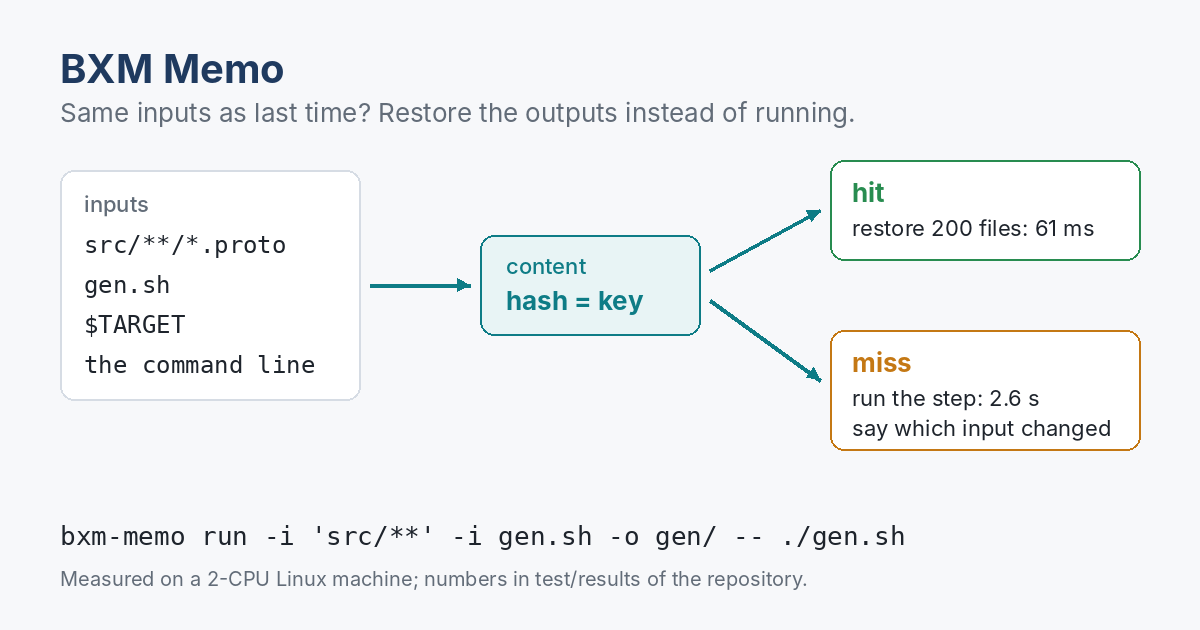
How Memo Works
- It expands the declared inputs (files, directories, patterns with
**) and hashes each file’s contents. - It combines those hashes with the command line, the declared environment variables and the platform into one key.
- If that key is in the cache, it checks every stored file against its hash, restores the outputs and replays what the command printed. Exit code 0, no work done.
- If not, it runs the command. If the command succeeds and wrote the outputs it promised, Memo stores them under the key for next time.
On a miss, Memo compares against the last run of the same job:
bxm-memo: miss gen.sh: input proto/user.proto changed
  env TARGET changed
What It Promises
- A failing command is never cached. Its exit code passes straight through.
- Restores are all or nothing. Every file is checked against its hash before anything is replaced. A damaged cache leads to a normal run, never to half-restored outputs.
- A directory output comes back exactly. Files the cached run didn’t produce are removed.
- An input that changes during the run means the result isn’t stored, because it may belong to neither version.
- An input pattern that matches nothing is an error, so a typo can’t make every run a hit.
- Many processes can share one cache. Every file goes in under a temporary name and is renamed into place, and an entry is written only after all its files. Give each process its own working directory, as separate CI runners or checkouts have. If two runs write the same output files in one directory at the same time, Memo can store a file the other run is still rewriting, and later hits restore that copy.
Each of these has a test. How it was tested.
Speed
For a step that reads 1,000 input files and takes 2.6 s to write 200 output files (about 10 MB), the cached run restored everything in 61 ms. Hashing the 1,000 inputs to decide hit or miss took about 40 ms. Measured on a 2-CPU Linux machine.
In CI
Point BXM_MEMO_CACHE at a directory your CI keeps between runs, for example with actions/cache, and wrap the slow steps. Results are kept per operating system and CPU type, so one cache can serve several runners. bxm-memo gc --max-size 2G keeps it in bounds.
What It Isn’t
Memo trusts what you declare. If a step reads a file you didn’t list, Memo can’t know about it, and a change to that file won’t cause a miss. It doesn’t sandbox the command to catch that. Declare generously; a directory as input is often the simplest choice.